> For the complete documentation index, see [llms.txt](https://iloveics.gitbook.io/icpswap/llms.txt). Markdown versions of documentation pages are available by appending `.md` to page URLs; this page is available as [Markdown](https://iloveics.gitbook.io/icpswap/products/staking-pool/how-to-use-staking-pool-to-earn-rewards.md).

# How to Use Staking Pool to Earn Rewards?

## How to stake

1. Open the [Staking Pool V2](https://app.icpswap.com/stake) page, select the live Pool you want to stake.

<figure><img src="https://2908727213-files.gitbook.io/~/files/v0/b/gitbook-x-prod.appspot.com/o/spaces%2F-Mj2H8Qamg5nV5E67YPh%2Fuploads%2FaGXhdgEZvytVWqimAxeb%2F1.png?alt=media&amp;token=0206d31c-e87f-4704-be01-97a30f370b57" alt=""><figcaption></figcaption></figure>

2. Enter the amount you want to stake, then select `Stake`.

<figure><img src="https://2908727213-files.gitbook.io/~/files/v0/b/gitbook-x-prod.appspot.com/o/spaces%2F-Mj2H8Qamg5nV5E67YPh%2Fuploads%2ForkmPr8ruu7EPILtbsvj%2F2.png?alt=media&amp;token=a0ff3571-51be-4bc1-9bc7-a2d3025d0a85" alt=""><figcaption></figcaption></figure>

3. Staked successfully.

<figure><img src="https://2908727213-files.gitbook.io/~/files/v0/b/gitbook-x-prod.appspot.com/o/spaces%2F-Mj2H8Qamg5nV5E67YPh%2Fuploads%2FTKSdZftEfMsciuNuI6jv%2F3.png?alt=media&amp;token=7bc61365-1aaf-41cf-9034-8a1a0ebad320" alt=""><figcaption></figcaption></figure>

## How to unstake

1. Locate the `Your Pools` option and select the pool you want to unstake.

<figure><img src="https://2908727213-files.gitbook.io/~/files/v0/b/gitbook-x-prod.appspot.com/o/spaces%2F-Mj2H8Qamg5nV5E67YPh%2Fuploads%2Fxf5WPdo86P8UeYAjYqgr%2F1.png?alt=media&amp;token=98aca161-b428-452a-b087-efa23dcc07df" alt=""><figcaption></figcaption></figure>

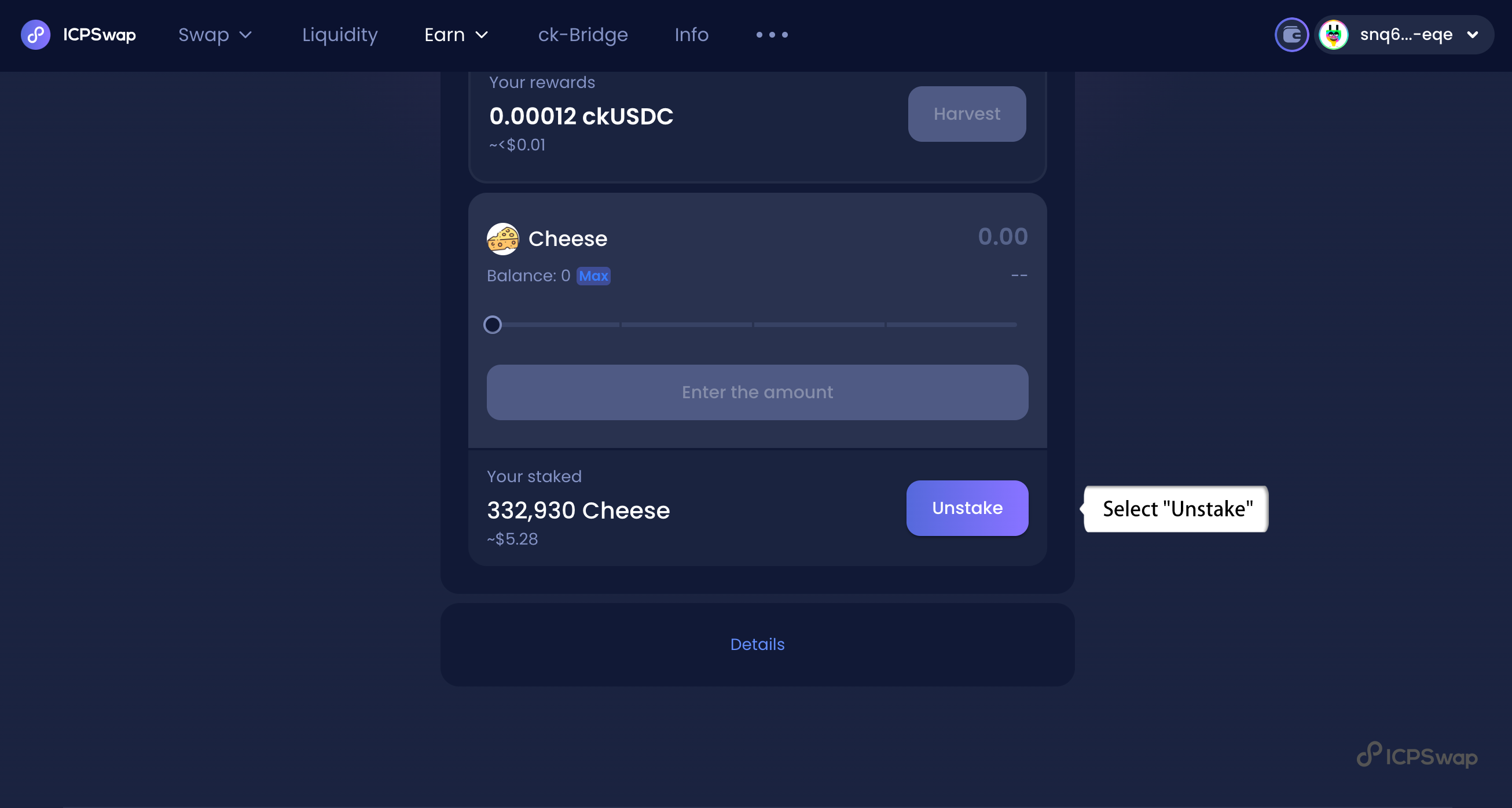
2.Select `Unstake`.

<figure><img src="https://2908727213-files.gitbook.io/~/files/v0/b/gitbook-x-prod.appspot.com/o/spaces%2F-Mj2H8Qamg5nV5E67YPh%2Fuploads%2FoTHOG9aTvNoMn0pRT5cu%2F2.png?alt=media&amp;token=0631e5c4-355a-4e4b-80ef-40f6e028e5e2" alt=""><figcaption></figcaption></figure>

3.Enter the amount you want to unstake, then select `Confirm`.

<figure><img src="https://2908727213-files.gitbook.io/~/files/v0/b/gitbook-x-prod.appspot.com/o/spaces%2F-Mj2H8Qamg5nV5E67YPh%2Fuploads%2Ff1jLfCTREs926LHDdU4x%2F3.png?alt=media&amp;token=21499517-ffe2-4b96-b4fa-b2dab82bb3f0" alt=""><figcaption></figcaption></figure>

4.Unstaked successfully.

<figure><img src="https://2908727213-files.gitbook.io/~/files/v0/b/gitbook-x-prod.appspot.com/o/spaces%2F-Mj2H8Qamg5nV5E67YPh%2Fuploads%2FS1TlaH6wHJsn7KCIbVYX%2F4.png?alt=media&amp;token=4c1283cf-9d6e-4a95-b325-9bef3f733b26" alt=""><figcaption></figcaption></figure>

{% hint style="info" %}
**Note**: You can unstake your Staking Pool anytime and receive the rewards directly in your wallet.
{% endhint %}

## How to harvest

Select `Harvest`, you will get rewards after harvesting your stake.

<figure><img src="https://2908727213-files.gitbook.io/~/files/v0/b/gitbook-x-prod.appspot.com/o/spaces%2F-Mj2H8Qamg5nV5E67YPh%2Fuploads%2FdwewOVC08bCE9suCoWUW%2F1.png?alt=media&amp;token=dd099cd0-8b8e-442c-8d91-237c642e3eeb" alt=""><figcaption></figcaption></figure>

## How to reclaim

1.If you encounter a failure during staking or unstaking, you can use the reclaim function to retrieve and reclaim your tokens.

<figure><img src="https://2908727213-files.gitbook.io/~/files/v0/b/gitbook-x-prod.appspot.com/o/spaces%2F-Mj2H8Qamg5nV5E67YPh%2Fuploads%2Fqc9hkJuIbvqeGNonuqMM%2F1.png?alt=media&amp;token=2c0690a8-5305-454d-a3d9-6a1f478dac9b" alt=""><figcaption></figcaption></figure>