# How to Create ICPSwap Wallet?

1. Enter the [ICPSwap app](https://app.icpswap.com)

<figure><img src="https://2908727213-files.gitbook.io/~/files/v0/b/gitbook-x-prod.appspot.com/o/spaces%2F-Mj2H8Qamg5nV5E67YPh%2Fuploads%2FAvPdfebik9slyREiAPiD%2F1.png?alt=media&#x26;token=f9969b8f-0ad6-40df-9086-1f365d4c3d3e" alt=""><figcaption></figcaption></figure>

2. Click `Connect Wallet`, then select ICPSwap Wallet.

<figure><img src="https://2908727213-files.gitbook.io/~/files/v0/b/gitbook-x-prod.appspot.com/o/spaces%2F-Mj2H8Qamg5nV5E67YPh%2Fuploads%2FsivEmHOoEVo6utz6pLFg%2F2.png?alt=media&#x26;token=84a24e8f-e2ea-4f82-9d4a-fc23bba2857e" alt=""><figcaption></figcaption></figure>

3. Click the New Wallet.

<figure><img src="https://2908727213-files.gitbook.io/~/files/v0/b/gitbook-x-prod.appspot.com/o/spaces%2F-Mj2H8Qamg5nV5E67YPh%2Fuploads%2FWOm4a4lJ7yUwzfh7DPjk%2F3.png?alt=media&#x26;token=1b9a12bd-1292-4315-bb5b-b0d3228dca7b" alt=""><figcaption></figcaption></figure>

4. Enter your Password, and click `Confirm`. Copy your mnemonic and save it carefully.

<figure><img src="https://2908727213-files.gitbook.io/~/files/v0/b/gitbook-x-prod.appspot.com/o/spaces%2F-Mj2H8Qamg5nV5E67YPh%2Fuploads%2F0PALssZQ2dKR8buaobQ5%2F4.png?alt=media&#x26;token=546df9f7-0a18-499f-9aa0-ffc15e792185" alt=""><figcaption></figcaption></figure>

<figure><img src="https://2908727213-files.gitbook.io/~/files/v0/b/gitbook-x-prod.appspot.com/o/spaces%2F-Mj2H8Qamg5nV5E67YPh%2Fuploads%2FD71MKxSeZa6sNbjHrOgK%2F4-1.png?alt=media&#x26;token=aa7cd98d-aa8d-4b71-9354-6074ec7e68f5" alt=""><figcaption></figcaption></figure>

5. Backup the wallet, Enter the mnemonic phrase.

<figure><img src="https://2908727213-files.gitbook.io/~/files/v0/b/gitbook-x-prod.appspot.com/o/spaces%2F-Mj2H8Qamg5nV5E67YPh%2Fuploads%2FLYSd2f5jWp3HaemXBLOE%2F5.png?alt=media&#x26;token=e8befe27-1033-45b8-9bbc-2a287e0cd317" alt=""><figcaption></figcaption></figure>

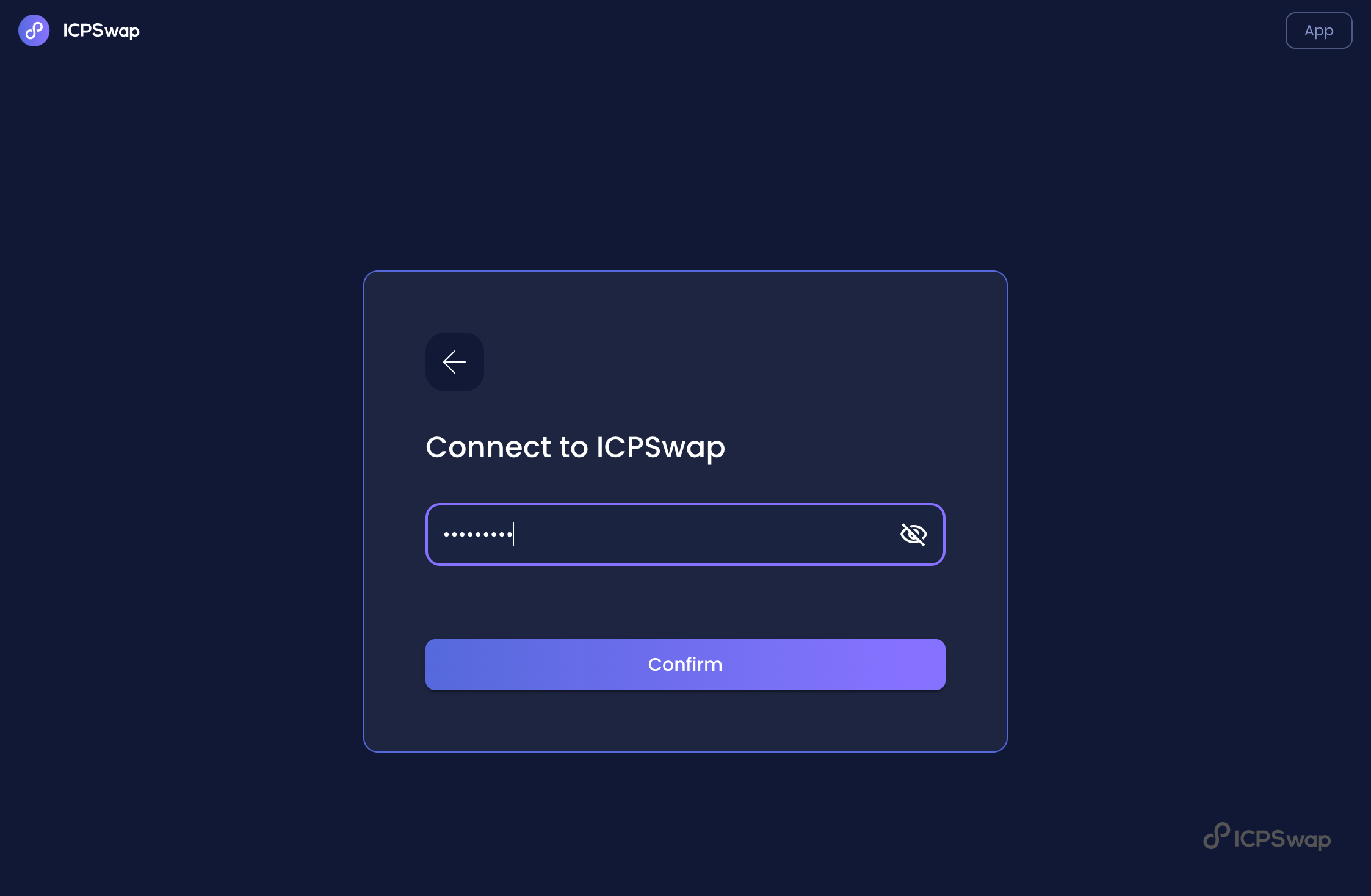
6. Enter the wallet password you set and use the ICPSwap wallet to connect ICPSwap.&#x20;

<figure><img src="https://2908727213-files.gitbook.io/~/files/v0/b/gitbook-x-prod.appspot.com/o/spaces%2F-Mj2H8Qamg5nV5E67YPh%2Fuploads%2FsWIgmgqJwDfLpl1JDv07%2F6.png?alt=media&#x26;token=9ceb0603-4bae-4db2-953e-0ea08d294cd4" alt=""><figcaption></figcaption></figure>

7. Congratulations, You have already an ICPSwap Wallet.

<figure><img src="https://2908727213-files.gitbook.io/~/files/v0/b/gitbook-x-prod.appspot.com/o/spaces%2F-Mj2H8Qamg5nV5E67YPh%2Fuploads%2F2JaVTs9PgbYyeB2uT7wX%2F7.png?alt=media&#x26;token=f36527d6-5bef-40fc-9db3-9a9f55ddcfc4" alt=""><figcaption></figcaption></figure>